Jump to a question in this guide
- What actually happens between a sensor and a lamp?
- What is the difference between a starter, condition and action?
- Why do “any” and “all” conditions change the result?
- What does a sensor know, and what remains outside its view?
- Who evaluates the rule: a local controller or an online service?
- What are a hub and a Thread border router for?
- Why can a command appear successful while the room remains unchanged?
- How can two reasonable rules work against each other?
- What does offline operation really mean?
- Why must convenience automation stay separate from safety protection?
- How do privacy, accounts and support life change the plan?
- What should a useful failure record contain?
- How would a fictional cupboard-and-lamp case be investigated?
- What belongs in a readable automation handover?
- Sensors, rules, commands and physical results are different jobs.
- Any/all logic and competing rules can change an intended response.
- Local commands do not establish that every feature works offline.
- Convenience automation must not become a safety or security dependency.
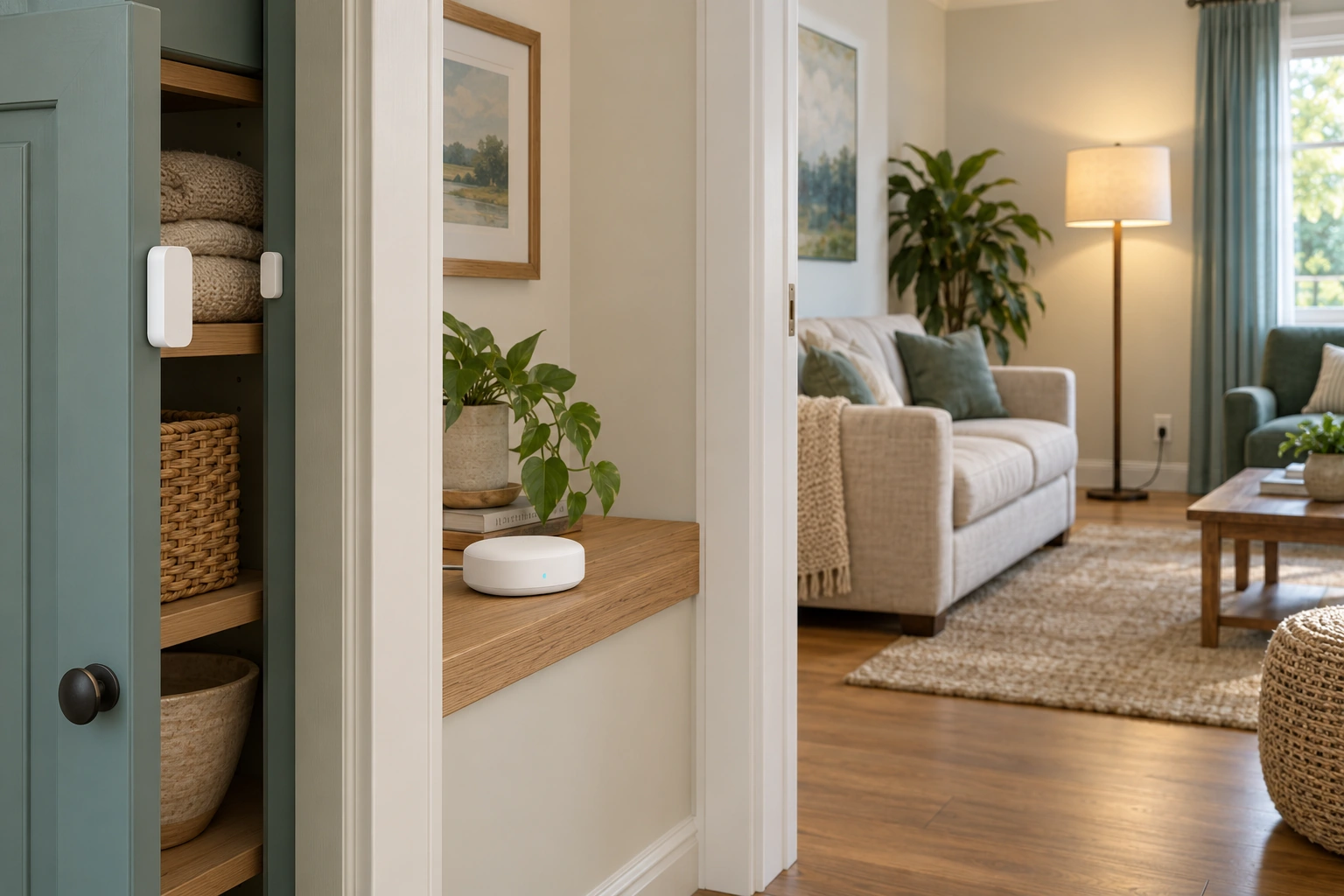
The cupboard’s contact pieces, shelf controller and ordinary lamp occupy one room context. A convenience rule can connect a local report to a requested lamp response through supported components.
About this illustration
No actual rule, radio path, command receipt, electrical design or safety function is shown. This is a conceptual teaching model, not an assessment of your home.
7 picture lessons appear beside the questions in this guide. Use them to understand the explanation, then consider what it means for your home.
What actually happens between a sensor and a lamp?
A simple convenience automation joins several jobs. A sensor reports a state or event. A rule decides whether that report and any required conditions should produce an action. A controlled device receives a command and changes something in the room. A lamp turning on is the physical result, while an app entry can be a report about one step. Keeping those jobs separate makes an unexpected result easier to describe.
Consider an interior cupboard sensor intended to switch on an ordinary lamp. The sensor does not send light into the room. It reports its own state through a supported connection. A controller or service evaluates the configured rule and sends a command to the supported lamp arrangement. Each part has a specific job and its own power, software, communication and compatibility questions.
The room cutaway places the closed sensor, hub and lamp together without invented radio rays. It introduces the parts before the native event-to-result figure explains their relationship. The illustration supplies no installed wiring, device identity or successful rule. Its harmless lamp example is a teaching choice, not permission to automate a heater, lock, cooker or another task whose failure could harm someone.
This guide owns general convenience-rule behaviour and failure investigation. The leak-sensor and automatic-shutoff guide remains the owner for water detection, valve action and plumbing limitations. Home internet owns the network route; the outage guide owns household contingencies. Those links matter because a functioning rule is only one part of a wider system, and an automation should not be mistaken for a safety system.
Follow an event to the physical result
A sensed report, rule evaluation and command are separate stages. An app acknowledgement does not substitute for the room outcome.
Numbers identify the parts explained below.
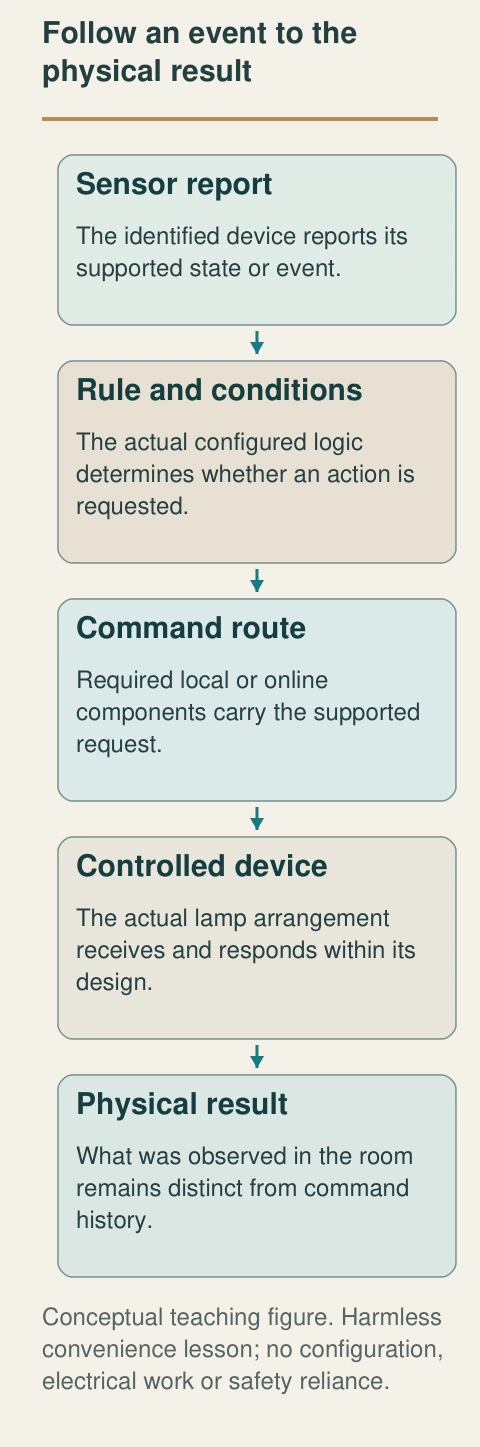
- Sensor report
The identified device reports its supported state or event.
- Rule and conditions
The actual configured logic determines whether an action is requested.
- Command route
Required local or online components carry the supported request.
- Controlled device
The actual lamp arrangement receives and responds within its design.
- Physical result
What was observed in the room remains distinct from command history.
What does this illustration leave out?
Harmless convenience lesson; no configuration, electrical work or safety reliance. This illustration explains an idea. It is not an installation guide.
Which stage has evidence, and which remains unresolved?
Explore this with HomeAI ↗Opens an editable question. Nothing is sent until you choose to send it.A sensor, controller and lamp perform different jobs
The cupboard’s contact pieces, shelf controller and ordinary lamp occupy one room context. A convenience rule can connect a local report to a requested lamp response through supported components.
Numbers identify the parts explained below.
- Cupboard sensor
Reports its model-supported state at the door.
- Closed controller
Represents a separate coordination role whose actual execution route needs confirmation.
- Ordinary lamp
The useful physical result differs from a command-history entry.
What does this illustration leave out?
No actual rule, radio path, command receipt, electrical design or safety function is shown. This illustration explains an idea. It is not an installation guide.
Which stage of this actual convenience task has evidence?
Explore this with HomeAI ↗Opens an editable question. Nothing is sent until you choose to send it.Read the complete figure
Follow an event to the physical result
A sensed report, rule evaluation and command are separate stages. An app acknowledgement does not substitute for the room outcome.
- Sensor report
- The identified device reports its supported state or event.
- Rule and conditions
- The actual configured logic determines whether an action is requested.
- Command route
- Required local or online components carry the supported request.
- Controlled device
- The actual lamp arrangement receives and responds within its design.
- Physical result
- What was observed in the room remains distinct from command history.
What remains unknown: Harmless convenience lesson; no configuration, electrical work or safety reliance.
A useful question: Which stage has evidence, and which remains unresolved?
What is the difference between a starter, condition and action?
A starter is the event or instruction that begins evaluation of a rule. A condition is a restriction that must be satisfied under the configured logic. An action is what the system is asked to do after the required evaluation. A schedule can be a starter, a supported device state can be a starter or condition, and a lamp command can be an action. Exact availability depends on the platform, editor and device.
For the fictional cupboard lesson, the starter is a reported opening, the condition is an identified allowed period and the action is a supported lamp-on command. The plain-language intention should be written before comparing it with the app configuration. That gives support a stable question: does the actual rule express this intention, and do the named devices support those roles?
Google’s current household-editor help separates these three components and warns that previous editors and third-party compatibility can differ. That is a named example of rule organization, not proof that every platform uses identical terms or that any listed device event works with the household’s model. Preserve the exact editor and device documentation when a rule is actually assessed.
An app accepting or saving a rule is one event in the setup. It does not itself demonstrate that the sensor reports, conditions are interpreted as intended, the action reaches the device or the lamp changes physically. Keep saved configuration and observed result separate. This page provides no configuration sequence or remote command; it teaches how to ask about the relationship and retain the evidence of any authorized support work.
The purpose should describe both the desired change and the circumstances that make it appropriate. Turn the lamp on is incomplete if the household intended it only during an ordinary cupboard visit. The fuller intention helps reveal an unnecessary action or an omitted restriction without adding technical jargon. It also creates a boundary for later review: a provider can compare the actual supported rule with a specific human goal. That is more useful than asking whether a smart-home package works when nobody has agreed which response should occur.
Three rule components with different jobs
- StarterBegins evaluation.
- ConditionRestricts the permitted evaluation under stated logic.
- ActionRequests a supported response.
Exact device/editor support varies.
Further reading: Google Home Help · Supported automation starters, conditions & actions.
Why do “any” and “all” conditions change the result?
Multiple conditions need a stated relationship. With any-condition logic, one qualifying condition can permit the rule under that arrangement. With all-condition logic, every required condition must qualify. These are different decision rules, even when the same words appear on the screen. The exact platform defines when it checks those conditions and which states it can use.
Consider a paper example after a valid starter has already occurred. Let A mean the cupboard is reported open, and B mean the current time is within the permitted period. With an all-conditions restriction, A true and B false does not permit the lamp request. With an any-condition restriction, that same pair permits it because A is true. This is a logic comparison, not a platform configuration: supported states, evaluation timing and the exact starter still come from the actual system. Keeping starter and restrictions separate makes the difference easier to explain.
Ask support to explain the actual logic with simple cases: when should the lamp be requested, and when should it remain unchanged? Keep the cases about the intended convenience use and within the actual manufacturer’s supported scope. A truthful explanation can identify an unresolved condition rather than pretending that every possible combination has been tested.
Do not read a natural-language label as a complete specification. A generated suggestion or short rule name may omit the full condition relationship, device identity or scope. Review the actual configuration with suitable support. This article does not create rules from prompts, supply a script or recommend experimenting on hazardous equipment. The goal is to understand what the rule means before treating an unexpected outcome as sensor failure.
Write a contrasting case beside the intended one. The cupboard can open outside the chosen period, or the period can begin while the cupboard remains closed. What should happen in each case? The answer should come from the intended rule and the platform’s actual evaluation, not from assumptions about ordinary language. Keep these as conceptual review questions until an appropriate verification occurs. An explanation of two cases cannot prove every timing combination, but it can make a misunderstood condition visible before a configuration is treated as complete.
A condition relationship changes the rule
Any and all are different logical restrictions. The plain-language intention needs to match the actual supported configuration.
Numbers identify the parts explained below.
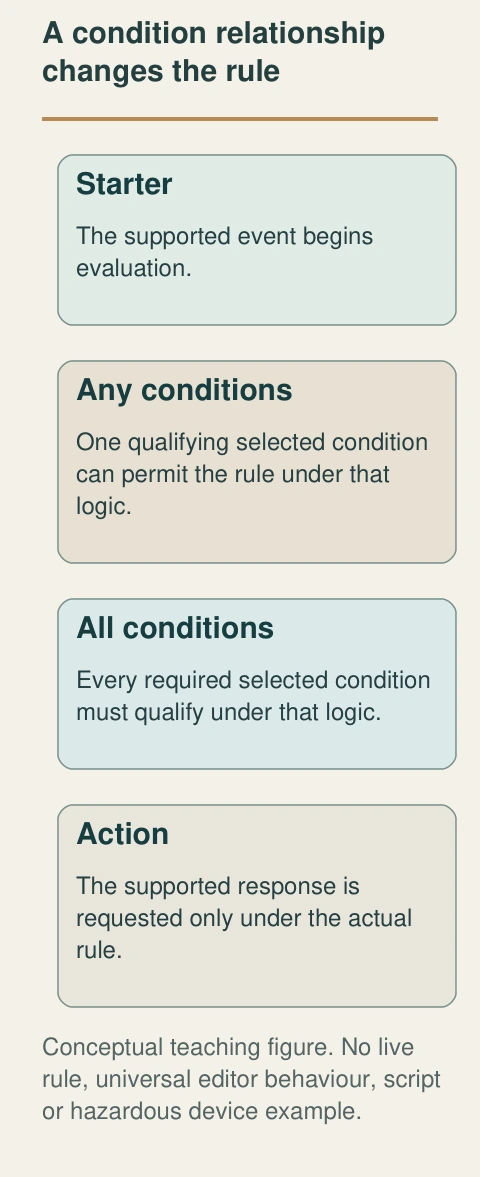
- Starter
The supported event begins evaluation.
- Any conditions
One qualifying selected condition can permit the rule under that logic.
- All conditions
Every required selected condition must qualify under that logic.
- Action
The supported response is requested only under the actual rule.
What does this illustration leave out?
No live rule, universal editor behaviour, script or hazardous device example. This illustration explains an idea. It is not an installation guide.
What should happen in each ordinary allowed and disallowed case?
Explore this with HomeAI ↗Opens an editable question. Nothing is sent until you choose to send it.Read the complete figure
A condition relationship changes the rule
Any and all are different logical restrictions. The plain-language intention needs to match the actual supported configuration.
- Starter
- The supported event begins evaluation.
- Any conditions
- One qualifying selected condition can permit the rule under that logic.
- All conditions
- Every required selected condition must qualify under that logic.
- Action
- The supported response is requested only under the actual rule.
What remains unknown: No live rule, universal editor behaviour, script or hazardous device example.
A useful question: What should happen in each ordinary allowed and disallowed case?
What does a sensor know, and what remains outside its view?
A sensor reports according to its design and the conditions at its location. A contact sensor can report the relationship between its matching parts. A temperature sensor reports at its own sensing location. Neither report automatically represents every door, surface or room in the house. The familiar part and its job should be named before the household uses the report as a wider conclusion.
The close sensor picture shows two closed pieces separated by an ajar cupboard door. That relationship explains the local state the teaching example concerns. It shows no exposed magnet, battery or diagnostic code. Actual orientation, installation, reported states and service requirements come from the matching product instructions. The picture cannot determine whether the household’s sensor is correctly positioned or operating.
A reported event and a physical observation can differ in time or scope. An app may display an earlier update, a state associated with another named device or information received after a delay. Record the source, timestamp and actual local observation when available safely. Ask the provider what the display represents instead of assuming that the icon is a live inspection.
An absent report is also limited evidence. It can concern the sensing, power, communication, account or reporting arrangement, rather than proving that the physical event never occurred. Do not open the sensor, bypass its function or create a hazardous condition to test it. Use the actual owner instructions and qualified support to resolve a defined question, keeping any inaccessible or unassessed condition explicit.
A contact report concerns the local matching pieces
The two closed sensor pieces are separated by the open cupboard door. Their relationship teaches why the sensor’s report concerns a local state rather than proof that a remote lamp responded.
Numbers identify the parts explained below.
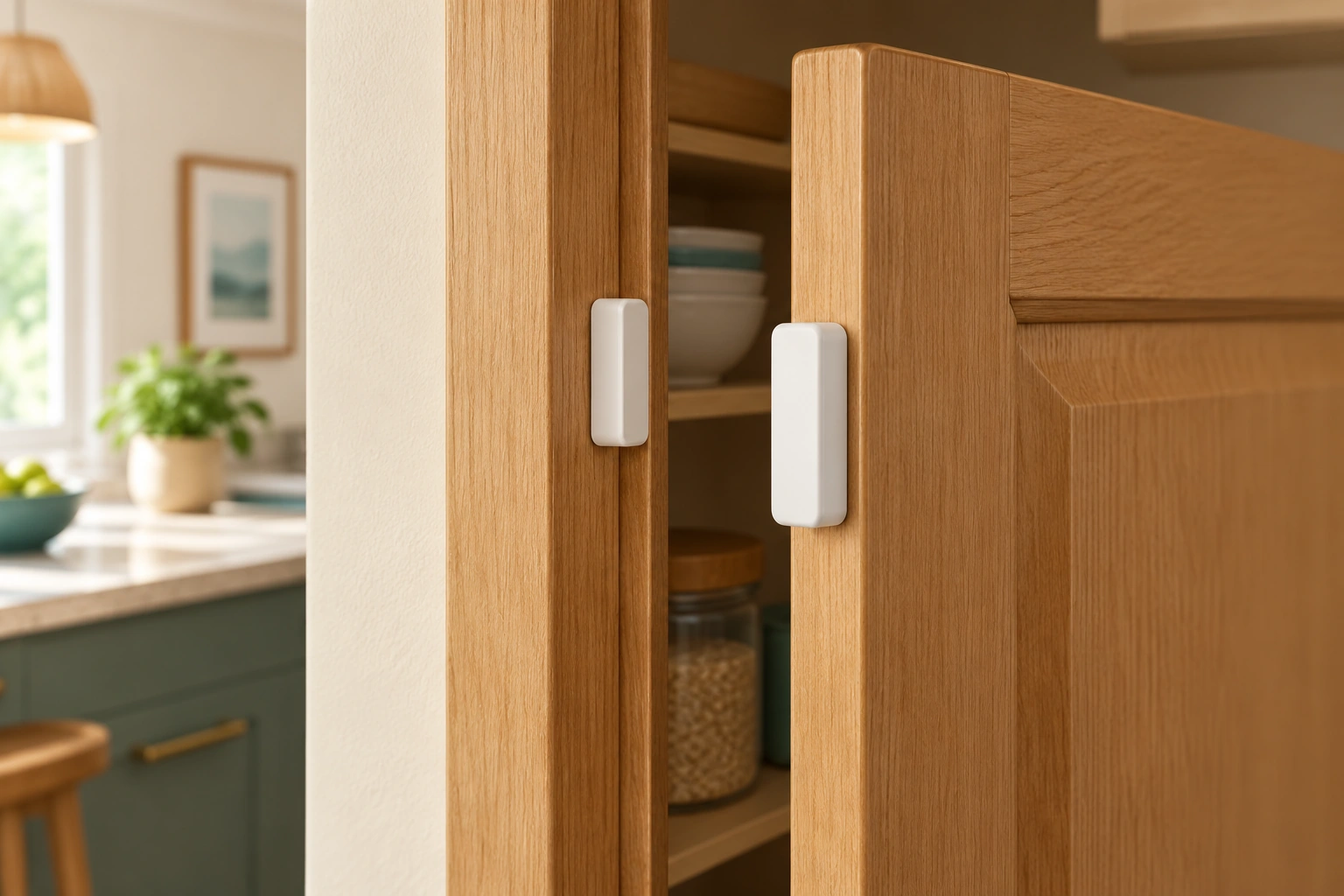
- Frame-side piece
One part of the local contact relationship.
- Door-side piece
Moves with the door in the conceptual example.
- Door gap
Visible separation is contextual geometry, not a product installation dimension.
What does this illustration leave out?
No exact orientation, model state, battery condition or diagnostic test is established. This illustration explains an idea. It is not an installation guide.
What does this actual sensor report and where is that report received?
Explore this with HomeAI ↗Opens an editable question. Nothing is sent until you choose to send it.Who evaluates the rule: a local controller or an online service?
Some supported commands can travel through local equipment and the home network. Others depend on an online service, sometimes involving both the platform provider and the device manufacturer. The route matters because every required service becomes part of the dependency chain. A hub sitting on a shelf does not prove that all rules run locally, and a device working through one app does not reveal every route it can use.
Google’s Matter preparation page illustrates local command handling and contrasts it with a cloud-mediated route in its ecosystem. That bounded explanation helps frame the question. It does not establish that every automation, remote-access feature, voice request or product works offline. Ask the manufacturer which functions of the actual combination remain available under the relevant interruption.
The shelf picture keeps the hub, router and phone visibly separate. Their closed cases teach distinct equipment roles without pretending to expose software execution. The native dependency figure then separates the local path from any required outside path. Its arrows represent conceptual communication, not measured latency, actual account access or an installation plan.
Write the answer per function. Local lamp control, a remote phone command and a notification sent outside the house may use different routes. If one continues during an interruption, it does not establish the others. Preserve the exact model, software context and provider statement with its date. An unexplained badge saying local or compatible should not become a blanket continuity or security claim.
The location of a command route and the ownership of the account are separate facts. A locally handled action may still have setup, update or remote-access requirements involving an account. A cloud-mediated feature may have more than one service provider. Ask who supports each role when the household changes equipment or an integration stops. Record the provider’s answer with its specific function rather than converting local into a broad assertion that no outside relationship exists. This keeps the dependency map useful across ordinary maintenance and service changes.
Closed devices can have distinct service dependencies
The hub-style device, router and phone sit separately on a shelf. Local control, networking and an app view have different jobs; actual commands may also depend on outside services.
Numbers identify the parts explained below.
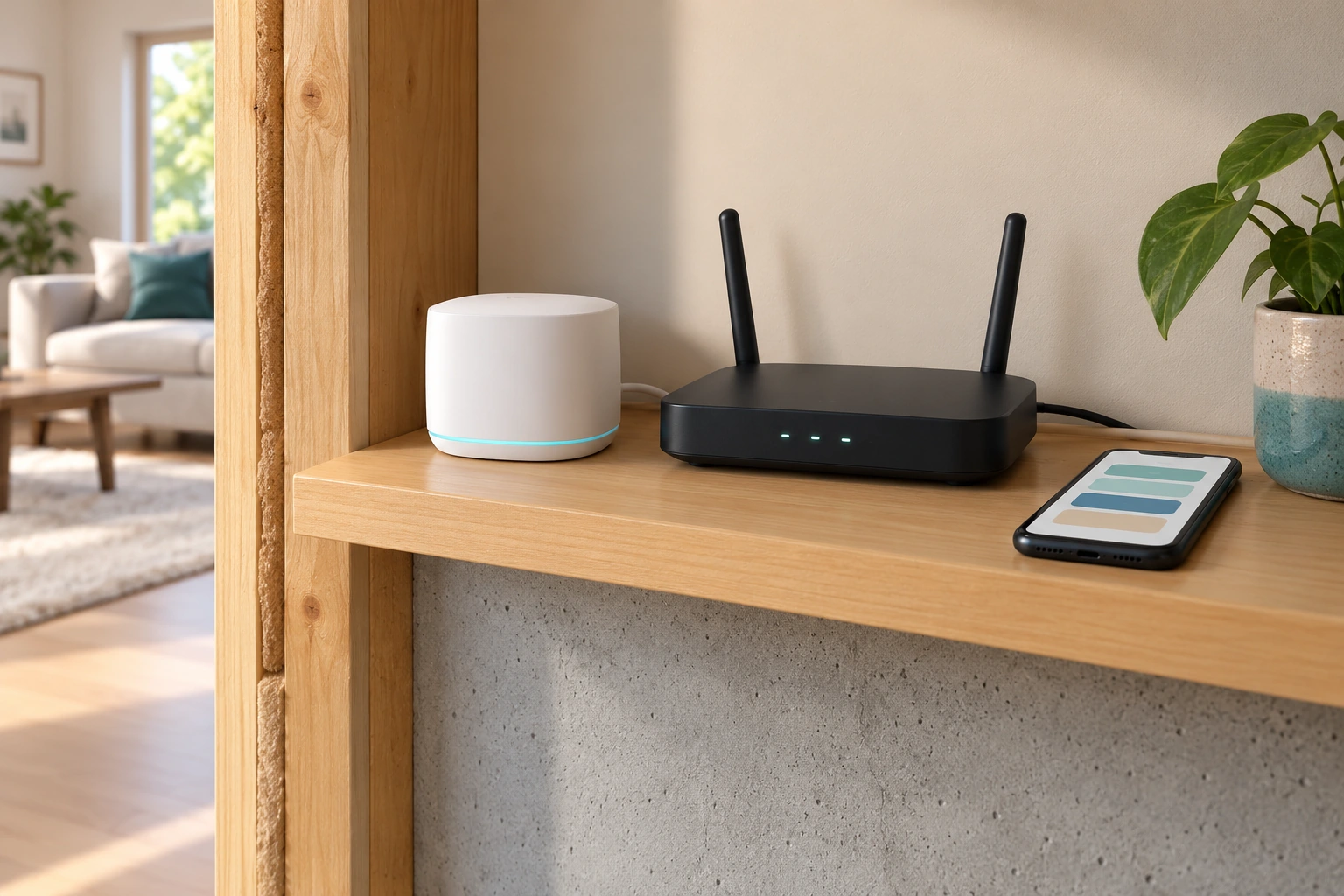
- Hub-style device
Its supported controller role needs exact model confirmation.
- Router
Provides a local network relationship separate from rule execution.
- Phone
Displays an abstract app view, not a successful physical outcome.
What does this illustration leave out?
No exact hub/Thread role, cloud configuration, account access or offline result is shown. This illustration explains an idea. It is not an installation guide.
Which actual functions run locally and which require an outside service?
Explore this with HomeAI ↗Opens an editable question. Nothing is sent until you choose to send it.What are a hub and a Thread border router for?
A hub can provide supported coordination or control functions for identified devices. A Thread border router connects an identified Thread network with another supported network. Those roles are not synonyms for every box called smart home hub. A single device can perform several roles, while another device may support only part of the required arrangement.
Google’s named Matter help distinguishes supported hubs and the additional Thread-border-router role for relevant devices. This guide adopts the role distinction, not its current product list or a purchase recommendation. Exact supported device types, models, software and platform capabilities need current confirmation. A compatibility logo alone does not establish that every desired starter, condition or action is exposed in the chosen editor.
Ask the provider to map the actual device’s communication route and controller requirement. Record whether the answer concerns ordinary local commands, remote access or automation execution. These can have different dependencies. If a required role is missing or unidentified, retain that as a task instead of assuming that another powered speaker or router automatically provides it.
Network settings can also be relevant, but a generic guide should not change them. Obtain model-matched support rather than enabling unfamiliar settings or disabling isolation to make an accessory connect. The home-internet guide explains local versus outside service; this chapter adds the smart-device roles that can sit on that network. The practical outcome is a readable map of the actual supported combination, with unresolved compatibility kept visible.
Why can a command appear successful while the room remains unchanged?
Several different acknowledgements can exist. An app can accept a request. A controller can record that a rule began. A service can report that it issued a command. The controlled device may provide its own state report. The household can observe whether the intended physical result occurred. Those events need not have identical meanings, timestamps or completeness.
For the lamp example, an action entry does not by itself establish that useful light appeared in the room. A physical lamp, its supported control, supply and ordinary local operation still matter. This is a general dependency explanation, not a diagnosis of a particular lamp. Do not use the illustration to select electrical parts or bypass a switch.
The lamp context picture shows the physical output and an ordinary control in the room. Its caption should explain that useful light is the end result while command history concerns an earlier layer. The native event-to-result figure retains both. Ask the provider what each available acknowledgement establishes and what evidence would resolve the missing relationship in this actual setup.
If electrical damage, abnormal heat or recurring trips are present, qualified electrical help takes priority over automation troubleshooting. Do not repeatedly toggle suspect equipment or move it among outlets to distinguish a rule problem. If the concern is ordinary software behaviour without a hazard, use the exact supported troubleshooting scope and retain the observed result. A later successful command remains one observed event, not universal future reliability.
A request is not the physical result
- App acceptedA request was received at that layer.
- Rule/action historyA stated event was recorded under its platform rules.
- Physical outcomeWhat actually changed in the room under observed conditions.
No actual log or result supplied.
Further reading: Google Home Help · Supported automation starters, conditions & actions.
How can two reasonable rules work against each other?
Rules can share a controlled device. One may ask a lamp to turn on while another asks it to turn off. The household may see an unexpected final state without realizing that both rules were acting under their own configuration. The relevant question is the combined arrangement and event history, rather than whether either rule has a sensible name in isolation.
Google’s current editor help warns about conflicting automations. That supports reviewing the actual rule set for an identified convenience task. It does not establish a universal priority order among platforms, apps or manual commands. Ask the actual provider how simultaneous, delayed or overlapping requests are handled, including commands originating from another supported app.
Schedules and delays add time relationships. A delayed action may refer to an earlier starter while a household member has already changed the device. Whether conditions are checked again, whether pending actions can be cancelled and how manual control interacts are platform-specific questions. Keep them unresolved until the matching documentation or support scope answers them.
Retain a small inventory naming each rule’s purpose, starter, conditions, target and relevant delay. This lets another person see shared targets without publishing private occupancy information. A change should identify which rule was altered and why. Do not remove every rule or reset all devices as an unexamined first step; that can erase the context needed to explain the actual interaction.
Manual changes also belong in an event account when known. A household member may have used an ordinary supported control while an app or another rule was active. That is not misconduct or proof that the automation failed; it is another request the actual system may handle according to its rules. Ask how the platform records those changes and whether its history distinguishes them. Retain uncertain attribution rather than naming the person or rule responsible from the final lamp state alone. A readable chronology can preserve several plausible explanations without choosing one prematurely.
What does offline operation really mean?
Offline needs a boundary. The home may have local power and networking but no outside service. A phone may be away from the home. A manufacturer service may be unavailable while the provider connection remains. A hub may be without power. Those are different conditions, and a function described as local can still depend on another required local component.
ISED’s consumer checklist asks which features work without internet and what happens if the manufacturer ceases operation. Those are useful lifecycle questions, not evidence that a particular device meets them. Ask for an explicit function list: ordinary manual use, local command, rule execution, remote access and notification. Keep each answer tied to the named combination and its current support information.
The native interruption figure shows different missing links separately so the reader can reason about an unavailable dependency. It does not ask the owner to pull plugs, block traffic or disable services. Any actual verification needs a safe, authorized, model-matched scope and consideration of other household functions. A simulated classroom relationship is not an outage test.
For the harmless lamp example, an ordinary usable manual control can be part of the actual fallback if its instructions and installation support it. Do not assume the same approach applies to locks, medical monitoring, heating or safety equipment. Those require their own appropriate provider and household plan. A convenience automation should remain convenient when it works, with its limits understood before anyone relies on it.
Offline has several different boundaries
Local power, local networking, outside service and account support are distinct dependencies. Each function needs its own explanation.
Numbers identify the parts explained below.
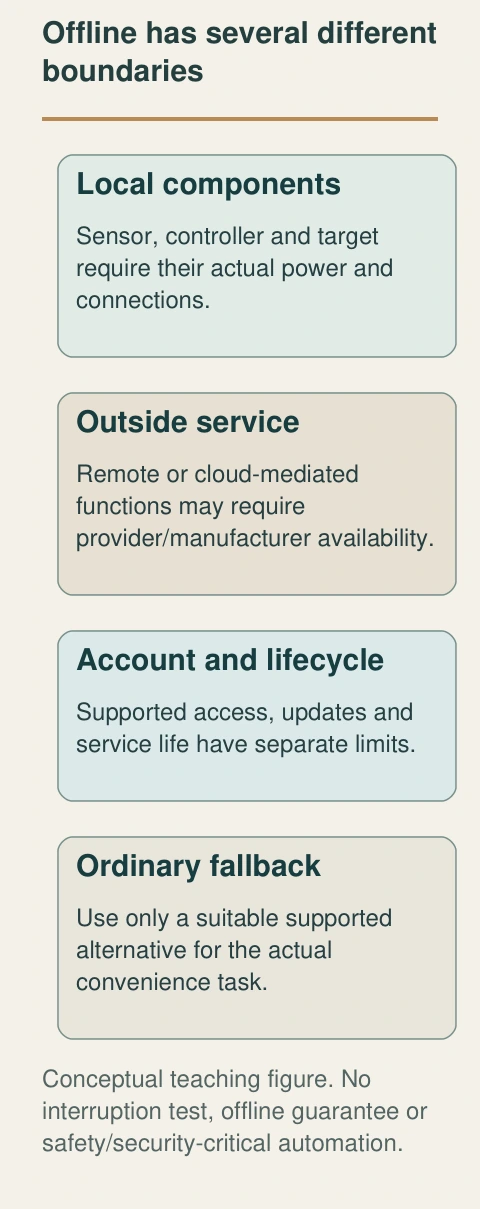
- Local components
Sensor, controller and target require their actual power and connections.
- Outside service
Remote or cloud-mediated functions may require provider/manufacturer availability.
- Account and lifecycle
Supported access, updates and service life have separate limits.
- Ordinary fallback
Use only a suitable supported alternative for the actual convenience task.
What does this illustration leave out?
No interruption test, offline guarantee or safety/security-critical automation. This illustration explains an idea. It is not an installation guide.
Which exact functions remain available under the named missing link?
Explore this with HomeAI ↗Opens an editable question. Nothing is sent until you choose to send it.An ordinary control is a separate convenience question
The lit lamp has a visible physical control and a cord reaching the wall; a phone lies aside. A supported ordinary control can be part of the actual convenience fallback without relying on an app.
Numbers identify the parts explained below.
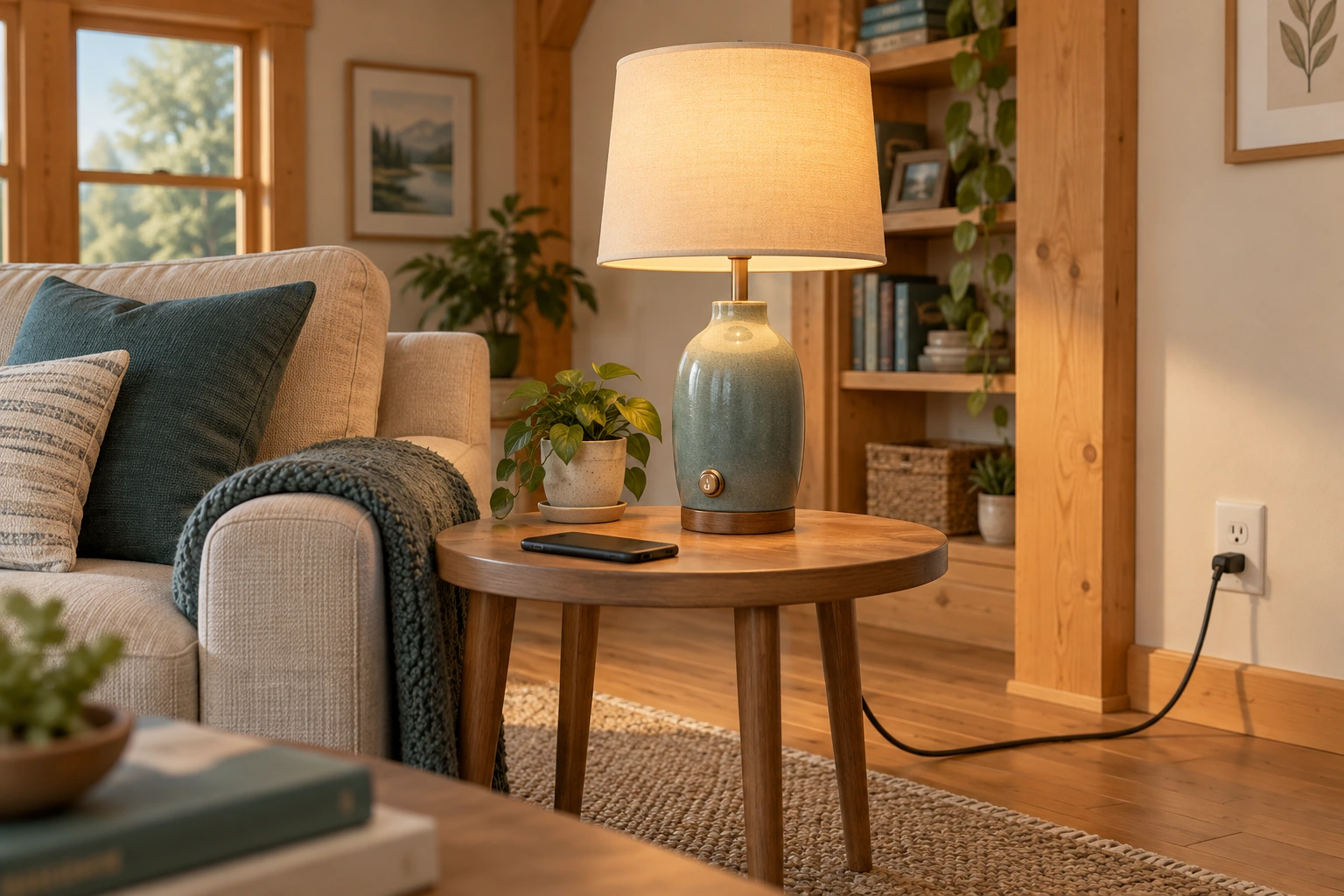
- Lamp and visible control
A familiar physical control role, governed by actual instructions.
- Cord and outlet
Visible ordinary supply context; no wiring assessment.
- Phone aside
The conceptual fallback question is separate from remote commands.
What does this illustration leave out?
No emergency lighting, electrical approval, demonstrated manual response or compatibility guarantee. This illustration explains an idea. It is not an installation guide.
What ordinary supported control remains usable for this actual task?
Explore this with HomeAI ↗Opens an editable question. Nothing is sent until you choose to send it.Name the unavailable dependency
- Local power or controllerRequired local functions can stop.
- Outside connection or serviceCloud/remote functions can be unavailable despite local power.
- Account or lifecycle supportSupported access and future service are separate questions.
Conceptual cases; no interruption test or continuity promise.
Further reading: Google Home Help · How to use Google Home for web & the Nest web app; ISED · Internet of Things Checklist for Consumers.
Read the complete figure
Offline has several different boundaries
Local power, local networking, outside service and account support are distinct dependencies. Each function needs its own explanation.
- Local components
- Sensor, controller and target require their actual power and connections.
- Outside service
- Remote or cloud-mediated functions may require provider/manufacturer availability.
- Account and lifecycle
- Supported access, updates and service life have separate limits.
- Ordinary fallback
- Use only a suitable supported alternative for the actual convenience task.
What remains unknown: No interruption test, offline guarantee or safety/security-critical automation.
A useful question: Which exact functions remain available under the named missing link?
Why must convenience automation stay separate from safety protection?
A useful routine can still fail to start, stop or deliver a notification. Google’s web-app guidance explicitly describes automations as convenience features and rejects safety- or security-critical use. That warning belongs beside the mechanism, not hidden after a tempting hazardous example. This guide therefore uses an ordinary lamp and cupboard rather than suggesting automated heat, cooking, access or emergency response.
A sensor notification is not a certified alarm, a remote camera feed is not a guaranteed emergency observation and a scripted action is not a professional safety design. Exact safety equipment and responsible providers have their own requirements. Keep the existing smoke, CO, electrical, water and outage guidance with its proper purpose instead of replacing it with a general smart-home rule.
Ask what happens when a component, account, outside service or household device is unavailable. The answer should identify an appropriate ordinary alternative for the actual convenience use. For essential needs, obtain a dedicated contingency from the responsible professional or service provider. A phone battery, an app history and a reassuring demo do not establish that a person will receive help during an emergency.
Do not experiment with a dangerous condition to demonstrate a starter. Do not bypass protection or automate a response that could cause harm if delayed, repeated or absent. This is a scope boundary, not a judgement that every connected device is useless. Understanding where the rule fits lets it serve a modest useful task without lending its success to unrelated safety claims.
How do privacy, accounts and support life change the plan?
A smart device can collect information about household routines, presence or recordings. A rule name or event history may reveal more than its owner expects. ISED asks consumers to examine collection, use and sharing alongside offline operation and support life. The equipment’s convenient function does not establish that its information practices match the household’s expectations.
Keep the administrative record private. Name the responsible account holder, support contact and location of appropriate recovery information without copying secrets into a public guide or contractor screenshot. Consider the household members and visitors affected by recording or presence features. A support request should include only the information needed for its purpose, with sensitive history limited appropriately.
Get Cyber Safe recommends strong unique credentials, updates and provider-assisted network separation for connected devices. Actual compatibility still needs attention. Ask support how a separate network affects required local discovery and commands. Do not disable security or expose equipment directly to the internet to overcome a connection difficulty. A network name alone does not establish isolation or complete protection.
Lifecycle questions belong in the handover: how long support is expected, how updates occur, what ordinary use remains if an account or service ends and what the actual manufacturer requires for transfer or disposal. A product continuing to light up is not the same as supported operation. No sale, account transfer, factory reset or data deletion is performed here; those actions require the appropriate actual instructions and authorization.
Changes to a household can change the acceptable use even when the hardware remains. A new occupant, guest or person needing an accessible ordinary control may require a clearer explanation or different convenience arrangement. Discuss the function and privacy effects with the people affected. Keep that discussion separate from technical compatibility: a supported device can still be a poor fit for the household’s intended use. The handover should identify the understood task and responsible support, rather than assuming that everyone can use the installer’s phone or interpret its private app history.
What should a useful failure record contain?
Record the intended task and the exact rule and devices involved. Add the event time, locally observed state, available app history and any recent known change. Keep reported information separate from direct observation and provider findings. If the action’s physical result was not observed, say so. A complete-looking timeline should not contain an invented successful action simply because the app recorded a request.
Compare the layers: did the sensor report, did the relevant rule begin, were its actual conditions satisfied, was an action issued and what happened at the controlled device? The available evidence may not answer every layer. Mark the unresolved boundary and ask the provider how it can be assessed. The native figure is a question map, not a universal log schema or owner diagnostic procedure.
Preserve the context before a supported change when safe and appropriate. A software update, renamed device, account change or edited rule can matter to the interpretation. Keep the prior record and add the later finding instead of rewriting the original symptom as a confirmed cause. This helps a second provider understand both why the support request began and what the first assignment actually resolved.
A finite successful check has a finite scope. Record the actual conditions and result, plus what remains untested. A proposed fix, saved configuration and one observed lamp response should remain separate milestones. Do not label the household automation reliable forever or the entire network certified. The useful result is a supported explanation for the task and an honest next step for the remaining uncertainty.
A provider can close a specific question while another stays open. For example, a review might establish the intended condition relationship without assessing the outside notification route. Write that distinction into the completion account. It prevents the word resolved from expanding beyond the assignment, and it gives a later provider a clear starting point. Ask what evidence supports the conclusion and which conditions would justify returning to support. This is a practical way to retain useful finite work without turning it into a promise about every future sensor event or service interruption.
How would a fictional cupboard-and-lamp case be investigated?
Iris is a fictional owner. Her ordinary cupboard lamp did not respond as expected on one evening. The app has an entry associated with a rule, but she has not confirmed whether it reports a starter, command or physical device state. The lamp’s ordinary manual use and exact model support also remain unassessed. She has enough to describe a problem without blaming the contact sensor.
She records the intended task, event time and safe observations. She asks support to identify the rule’s actual starter, condition relationship and target, and to explain the available history. The provider also clarifies whether another rule targets the same lamp and which local or outside services the arrangement requires. Iris does not open devices or disable the network to simulate a failure.
The invented support review finds that the rule names a different lamp from the cupboard lamp in Iris’s written intention. Its history records a request to that configured target, rather than a finding that the intended cupboard light changed. That resolves one mismatch without diagnosing the contact sensor or proving delivery to either lamp. Iris asks support to document any authorized correction and its finite verification. She keeps device power, communication and physical response as separate questions if the original concern remains.
External notifications were outside the invented support assignment, so the record leaves them unverified. Iris retains the ordinary manual arrangement for the convenience task and the exact intended lamp identity in the handover. The example supplies no real configuration recipe, measured delay, successful test or safety protection. Its useful result is a corrected question and a record of what the app entry actually meant.
What belongs in a readable automation handover?
Write the purpose in one sentence, then name the sensor, controller or service, rule and controlled device. Record exact models and the current support documents. Add the starter, condition relationship, target action and any relevant timing. Keep local and cloud dependencies distinct. Someone reading the file should understand what the arrangement tries to do before interpreting its app screens.
List completed authorized work and observed checks separately from expected behaviour. Preserve findings, limits and unresolved questions with their dates. Keep an ordinary fallback appropriate to the actual convenience task and identify the responsible support contact. Do not infer that a builder’s generic smart-home package demonstrates every rule or that a seller’s former account automatically transfers to a buyer.
Use the home-internet guide for the router and local links, the leak-sensor guide for detection and valve limitations, and the outage plan for household needs when services fail. Add dated equipment and tasks to the home-care record while keeping credentials and sensitive histories private. These connections make the handover useful without duplicating the canonical guide for each specialized system.
The reader should be able to explain what the sensor reports, what the rule evaluates, how the command travels and how the physical result is known. They should also know what happens when a link is unavailable and who can address an unresolved boundary. That practical understanding is deeper than a device inventory or a successful demo, while remaining separate from an actual installed-system reliability or safety finding.
Keep the original wording of important provider limits with the file. A short household summary can explain their purpose, while the matching document preserves the detail another support person may need. Update the summary when the actual arrangement changes, retaining its previous dated evidence.
Keep learning about the connected parts
- Leak sensors and automatic shutoff: understand detection, valve action and response
- A power outage plan for heating, water and communications
- Why does a breaker trip? Understand GFCI and AFCI protection
- Build a home-care record that the next person can understand
- How home internet works: follow the service, router and room connection
- Build a better property team: match the question to the specialist
Canadian context and authorities · Visual atlas · Learning labs
Practice the distinction.
Iris follows a lamp event through the layers
Fictional convenience case: a lamp did not respond as expected and an app entry’s meaning is unconfirmed.
Reported observations
- The invented written intention names the cupboard lamp.
- The invented configuration review names a different target; history records a request to that target, not a physical outcome at the intended lamp.
- External notifications remain outside scope; no hazardous condition or network interruption is staged.
Compare the explanations
Expand each possibility to see the evidence needed to distinguish it. Similar symptoms can have different mechanisms.
Rule logic or another request matters
Conditions and shared targets need supported review.
Actual configuration and scoped history interpretation.
A report, route or physical response is unresolved
Each layer has its own evidence boundary.
Model-matched provider finding and finite verification scope.
A useful next question
Have appropriate support document any authorized target correction and finite verification, preserving communication and physical-result questions separately.
No real diagnosis, configuration recipe, measured timing or safety/security protection.
Know what the words mean.
- Starter
- The supported event or instruction beginning a rule’s evaluation.
- Condition
- A configured restriction evaluated under the platform’s stated logic.
- Action
- The requested supported response after the rule’s required evaluation.
- Actuator
- The controlled part that changes a physical state; a lamp control is a convenience example.
- Cloud dependency
- A required outside service whose availability is distinct from the local network.
Questions to bring
to the conversation.
- What exact convenience task is intended?
- Which sensor, rule, controller and target perform it?
- What logic and service dependencies are confirmed?
- What did the history actually record and what result was observed?
- Which fallback and support scope address the remaining question?
Separate a showing observation, an existing record and a new professional assessment. Unknown means a question remains; it does not automatically mean a defect.
Use the evidence planner ↗Go to the source.
Original HomeAI explanation informed by these public references. Sources support the underlying guidance; they have not reviewed or endorsed HomeAI. Diagrams are conceptual, and calculator outputs depend on your inputs.
Complete substantive current Google rule/web/Matter, ISED and Get Cyber Safe bodies personally read October 14. Exact named-editor/device scope, undated changing help and historical page dates retained. Contradictory current light-effect support passages withheld. No hazardous/safety/security-critical rule, script, prompt-generated configuration, feature/subscription entitlement, setting change, reset, electrical work, interruption test or actual reliability result supplied. Fictional lamp case remains conceptual.
Publication & source review
First published .
Sources reviewed .
Have a question about your home?
Start with the symptom, timing and what you have observed.
Ask HomeAI